New Credentials
This function enables the addition of credentials for SSH/SNMP/Windows components by entering values for the parameters present in the New Credentials window. Credentials are encrypted and stored in the Virima customer database.
Credential Types
The following are the types of available credentials.
AWS_Account. Used for importing AWS Resources.
AZURE_Account. Used for importing Azure Resources.
EMC_VNX. Used to scan the EMC storage server.
Kubernetes. Used for scanning Kubernetes Clusters.
Meraki. Used to import Meraki devices such as Access Points, Switches, Firewalls, and Routers.
SNMP and SNMP_v3. Used to scan SNMP device.
SQL_Server. Used for scanning the databases running inside MSSQL Server.
SSH. Provided for SSH Probes (mainly Unix Hosts and ESXi Hosts). Specify the Username, Password and Priority.
SSH_PRIVATEKEY. Provided SSH Probes (for Hosts with a PRIVATE KEY).
VCenter. Used to scan Vcenter's through API.
VMWare. Used for scanning VMWare vCenter & vSphere servers.
Windows. Used for application dependency Discovery in windows hosts.
Windows_AD_Domain_Controller. Used to scan domain networks. It is recommended to provide domain controller credentials.
XtremIO. Used for scanning XtremIO storage servers.
New Credential
| 1. | In the main window, click Admin > Discovery > Credentials. The Credentials window displays. |
| 2. | From the Select Actions drop-down list, choose New Credentials. A new window displays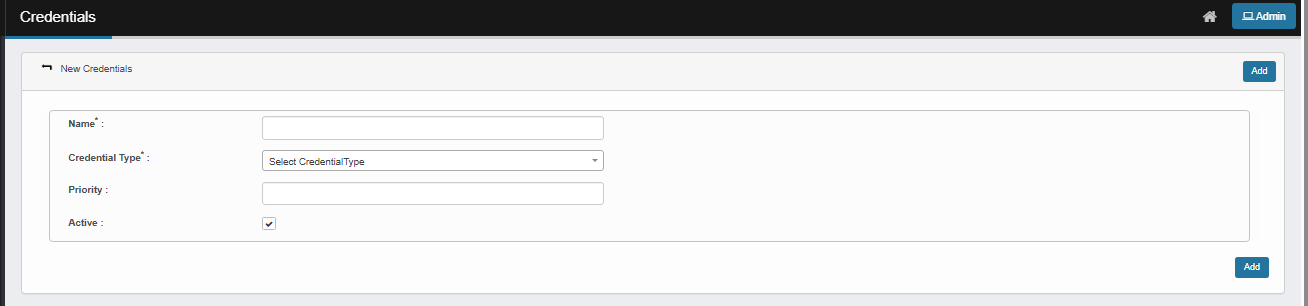 |
| 3. | In the Name field, enter a name for this credential. |
| 4. | In the Credential Type field, click the drop-down list select an available type. |
|
Based on the type of credential selected, the fields in the window change. |
| 5. | Provide the required details for the type selected (refer to the list above). |
| 6. | If an IP Range field is shown, enter the IP Address information in one of the below formats. (This field is not required.) |
192.168.48.1 (Single IP)
192.168.48.1 192.168.49.2 (Multiple IPs of Different Subnets)
192.168.48.1,2,3,4 (Multiple IPs of Same Subnet)
192.168.48.1-50 (A wide Range of IPs in a Subnet)
192.168.48.0/24 (Single Subnet/CIDR Notation)
192.168.48.0/24 192.168.49.0/24 (Multiple Subnets/CIDR Notation)
| 7. | In the Priority field, Assign a numeric value to prioritize this credential over others. Lower numbers have higher priority. Useful when multiple credentials are associated with overlapping IP ranges. |
| 8. | In the Active field, When checked, the credential is enabled and will be used during discovery attempts. If unchecked (inactive), the credential will be ignored during discovery. |
| 9. | When all selections/entries are made, click Add. |
To successfully add a new credential, the following details are mandatory based on the credential type:
|
Related Topics